



 0
0
Audience: Membership Chair
Introduction
Volunteers in SCORE can participate in different positions. Some of these positions are in leadership roles in which volunteers are appointed as leaders. Some positions are voluntary such as Coach and/or Interviewer. An individual can hold more than one position and a position can also be held by more than one individual. This guide is intended to provide Chapter Managers the various positions available in Engage and how to assign and remove positions.
Note: To view the full list of notifications for the Volunteer Journey, click here. (You must be signed in to your @scorevolunteer.org account.)
Table of Contents:
___________________________________________________________________________________________________________
Positions
| Position | Description |
| Associate District Director | The associate district director is appointed by the district director to assist in the management of the district. |
| Chapter Chair | The person who leads the chapter. |
| Coach | A volunteer assigned to mentor/guide a provisional volunteer through the training, onboarding, and socialization at the chapter. |
| Co-Chair | The volunteer who splits the chapter chair's responsibility with another Co-Chair. |
| District Director | The District Director is a volunteer management position, appointed by the SCORE Vice President of Field Operations and reporting to the Regional Vice President. The District Director is responsible for the management and performance of the district and its chapters consistent with the SOM and in compliance with the minimum standards. |
| Event Manager | Creates workshop record in SCORE Engage. Manages workshop logistics, assignment of presenters, event marketing, and content. Works with workshop coordinator to manage workshop check-in process. |
| Interviewer | A volunteer assigned to interview a prospective volunteer. |
| Marketing Chair | The marketing chair is responsible for local marketing campaigns, local partnerships, and SCORE brand awareness building in the community. |
| Membership Chair | Manages chapter rosters and assists with ongoing volunteer engagement activities. |
| Regional Vice President | The Regional Vice President is a volunteer management position, appointed by and reporting to the SCORE Vice President of Field Operations. The RVP is responsible for the management and performance of the region, including districts, and chapters consistent with the SOM and in compliance with the minimum standards. |
| Secretary | The secretary performs the duties normally incident to that office, including the following (unless delegated elsewhere): keeps minutes of chapter meetings and training sessions, tracks compliance on required National forms and volunteer training., and assists the Chair in the implementation or delegation of chapter activities at the discretion of the Chair. |
| Social Media Chair | The social media chair is responsible for the following: building SCORE Online Community, managing the chapter's social media account and social media analytics, audience engagement, and content creation. |
| Treasurer | Oversees the financial administration of the District. |
| Vice-Chair | Chapter leader, directly below chapter Chair. |
Assign a Position
- Type the volunteer’s name into the search bar. Click Search.
- Click the volunteer’s name from the list to open their contact record.
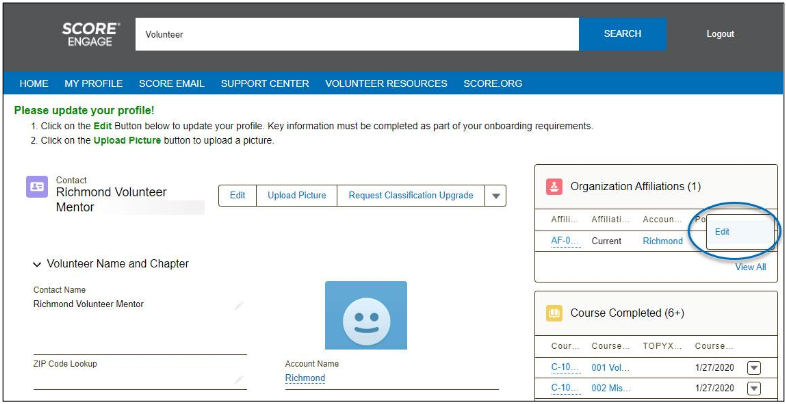
- On the right column is the Organization Affiliations section, click the drop-down arrow
 and click Edit.
-
-
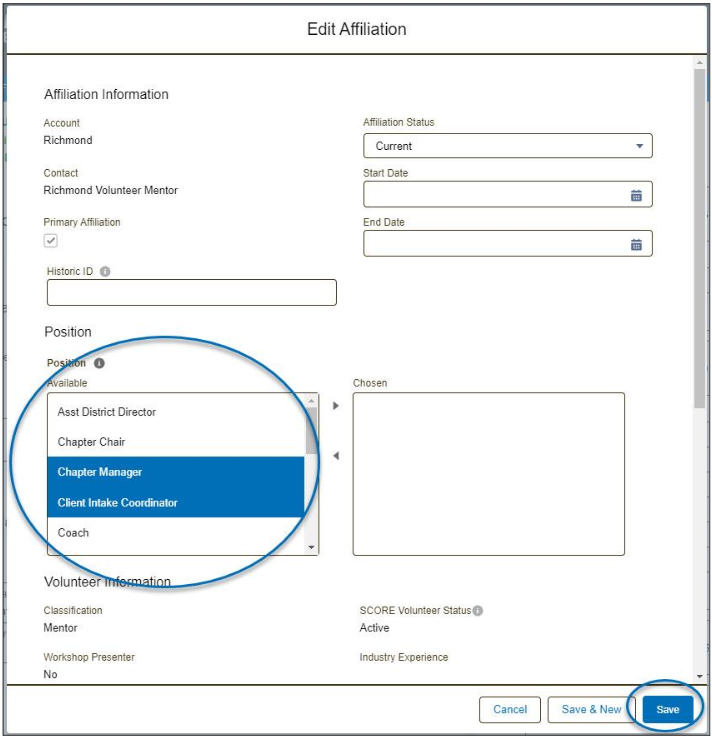
Engage Positions and PermissionsLocate the Position held. Highlight the Position by clicking on the position name. Click on the arrow
 to move the position to the Chosen column. To select more than one position, hold down the Ctrl button while clicking on the position names. Click Save.
Relevant Resources:
- Organizational Structures and Job Descriptions
-

